


By using this site, you agree to the Privacy Policy and Terms of Use.
Accept
Scoopico
  • Home
  • U.S.
  • Politics
  • Sports
  • True Crime
  • Entertainment
  • Life
  • Money
  • Tech
  • Travel
Reading: Can you disable ANNA in Forza Horizon 6?
Share
Font ResizerAa
ScoopicoScoopico
Search

Search

  • Home
  • U.S.
  • Politics
  • Sports
  • True Crime
  • Entertainment
  • Life
  • Money
  • Tech
  • Travel

Latest Stories

‘He’s got to work that out’
The Trump-Xi Summit in China Was Remarkably Banal
SwitchBot Lock Vision: 3D Facial Recognition and Matter Wi-Fi Lock
A Guide to the One Tree Hill Cast’s Dating Histories Through the Years
Skeletal remains of new dinosaur weighing as much as 9 elephants discovered by scientists: “The last titan”
Have an existing account? Sign In
Follow US
  • Contact Us
  • Privacy Policy
  • Terms of Service
2025 Copyright © Scoopico. All rights reserved
Can you disable ANNA in Forza Horizon 6?
Sports

Can you disable ANNA in Forza Horizon 6?

Scoopico
Last updated: May 15, 2026 4:44 pm
Scoopico
Published: May 15, 2026
Share
SHARE


Forza Horizon 6 has a new automated navigation system, that the game calls ANNA. The Automated Natural Navigation Assistant, abbreviated to ANNA, can be a useful tool for navigation and to quickly find your next race. However, it can also become annoying really quickly, since it uses its “voice” to announce every small detail. As such, you might want to know if ANNA can be disabled in Forza Horizon 6.

Yes, you can disable ANNA in Forza Horizon 6. Instead, you can choose to have a different navigation system. In this article, we will explain how you can do it easily.

Also read – Forza Horizon 6 review: Simcade immersion meets open-world freedom


How to disable ANNA in Forza Horizon 6
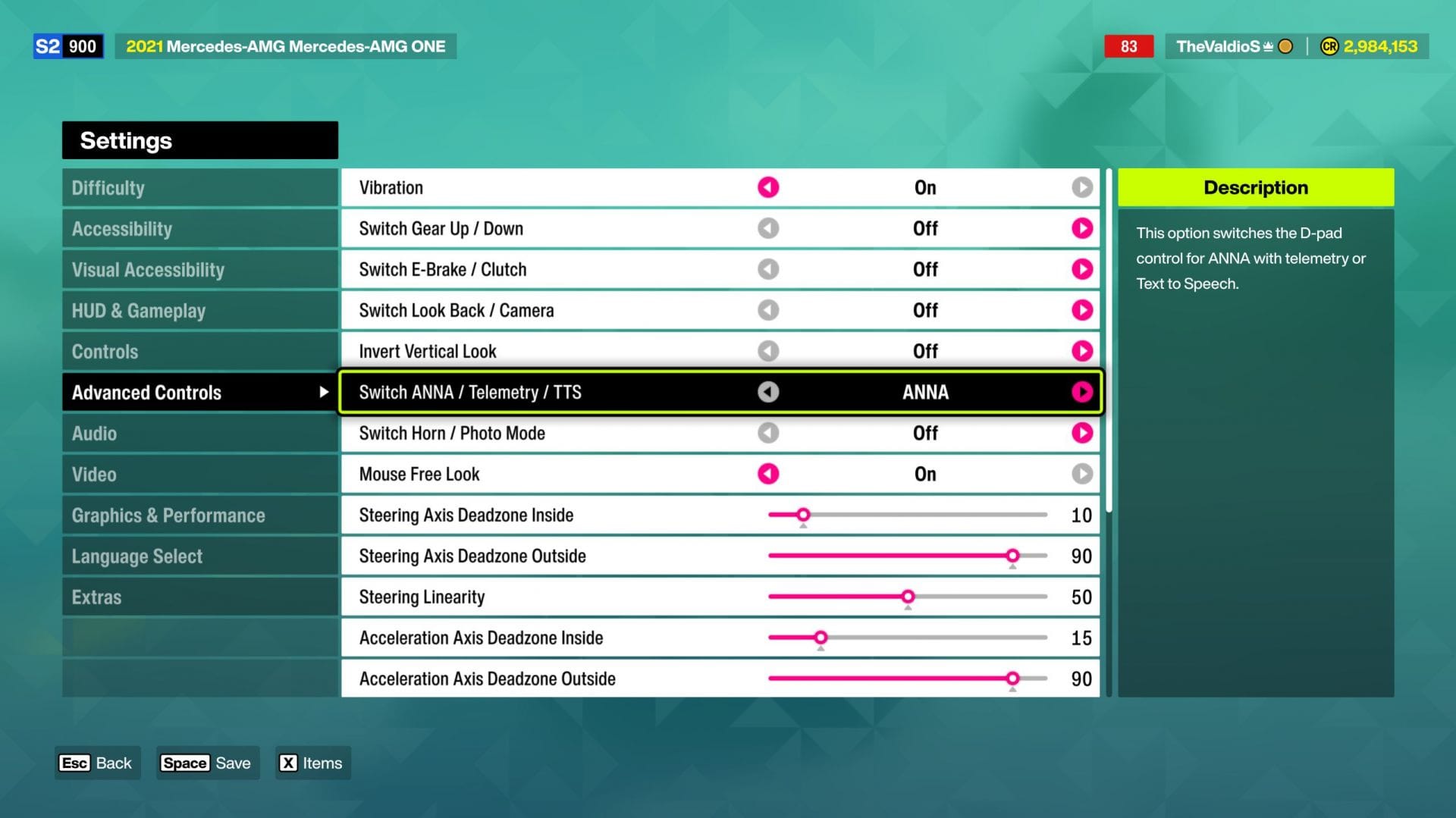
Here's how you can disable ANNA (Image via Sportskeeda Gaming || Xbox Game Studios)Here's how you can disable ANNA (Image via Sportskeeda Gaming || Xbox Game Studios)
Here’s how you can disable ANNA (Image via Sportskeeda Gaming || Xbox Game Studios)

Here are the steps to disable ANNA in Forza Horizon 6:

  • Go to the Pause menu and head to Settings.
  • Head to the Advanced Controls option.
  • Locate the Switch ANNA / Telemetry / TTS tab.
  • Change from ANNA to your desired option.

Other than ANNA, there are two other options that you can choose here – Telemetry and TTS.
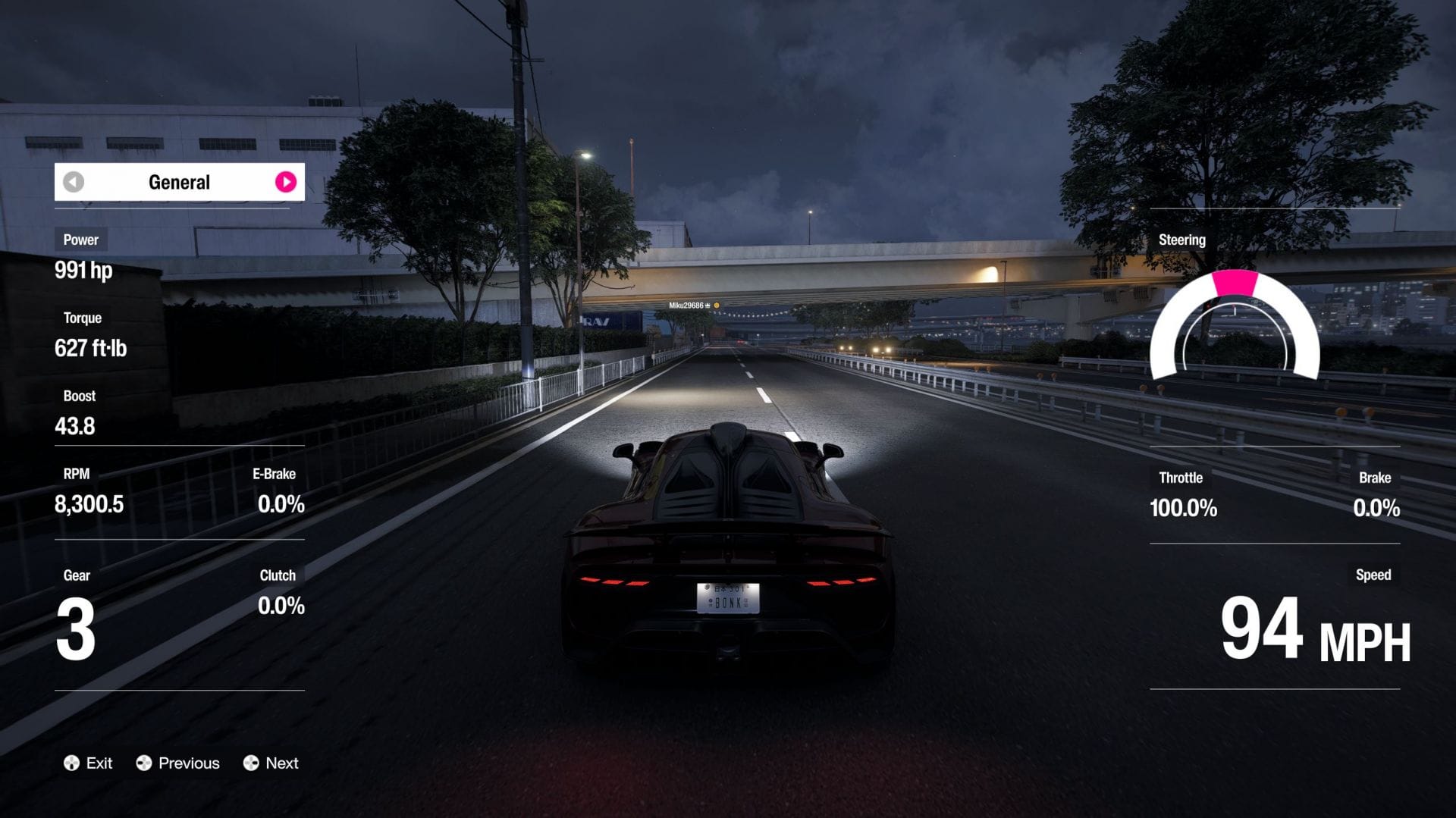
Telemetry shows you a bunch of information on the screen (Image via Sportskeeda Gaming || Xbox Game Studios)Telemetry shows you a bunch of information on the screen (Image via Sportskeeda Gaming || Xbox Game Studios)
Telemetry shows you a bunch of information on the screen (Image via Sportskeeda Gaming || Xbox Game Studios)

Telemetry will show you a bunch of details on your screen when activated, like the power, torque, gear, exact speed, centering, and a lot more. If you are into the more technical details, then Telemetry mode is ideal for you.

On the other hand, TTS, or Text To Speech, is the most minimally invasive option that you can find in Forza Horizon 6 instead of ANNA. It will only inform you of the necessary details, and stays shut for the most time. If you are someone who has spent a significant amount of time on the earlier titles like FH5 or FH4, this the best option around.


For more articles on Forza Horizon 6, check out the following:
